

Incoming webhooks
A webhook is a URL that starts an automation when another service sends it a request. The request’s JSON body becomes the automation’s input: a body of {"order": {"id": 42}} is read as {{input.order.id}}. The request’s headers and query parameters arrive next to the body, as input._headers and input._query (see What the automation receives).
The webhook URL
Section titled “The webhook URL”Every webhook URL has this form:
https://api.work.studio/api/v1/workflow/webhook/ingress/<endpoint>The <endpoint> part is generated for you and can’t be changed. The URL accepts GET, POST, PUT, PATCH and DELETE; each webhook narrows that with Allowed HTTP methods (POST by default). Other methods get 405.
Webhook URLs come from Webhook triggers. Add one in the editor’s Triggers panel (see Triggers). The URL ends in the trigger’s binding id, and the trigger starts signed (see Signatures).
Only people who can edit the automation see its webhook URL. Viewers don’t see the URL, a delivery’s content or any payload, in Flow, in my.studio or through the API.
Webhook settings
Section titled “Webhook settings”Open the Webhook trigger and select Edit trigger to change its webhook’s settings:
| Setting | Default | What it does |
|---|---|---|
| Authentication | None | A credential the sender must send as well (see Authentication) |
| Require a valid HMAC signature | On | The sender signs each request with the signing secret (see Signatures) |
| Sender | Generic HMAC-SHA256 | Which signature layout to check: Generic, GitHub, Stripe, Slack or Shopify |
| Require X-Webhook-Timestamp | On, and fixed on, for new Generic webhooks | The signature must cover a timestamp, so a captured request can’t be replayed |
| Response | Wait until the run has started | Answer 200 with the run id once the run starts, or Acknowledge immediately with 202 (see What the sender gets back) |
| Wait timeout (seconds) | 10 | How long the sender is kept waiting for the run to start, 1 to 170 |
| Allowed HTTP methods | POST |
Other methods get 405 |
| Rate limit (requests / minute) | 100 | Requests over the limit in a minute get 429 |
| Max body size (KB) | 1024 (1 MB) | A larger body gets 413. The ceiling is 10 MB |
| Allowed IP addresses | Empty (all) | IPv4 addresses or CIDR ranges, or exact IPv6 addresses. Others get 403 |
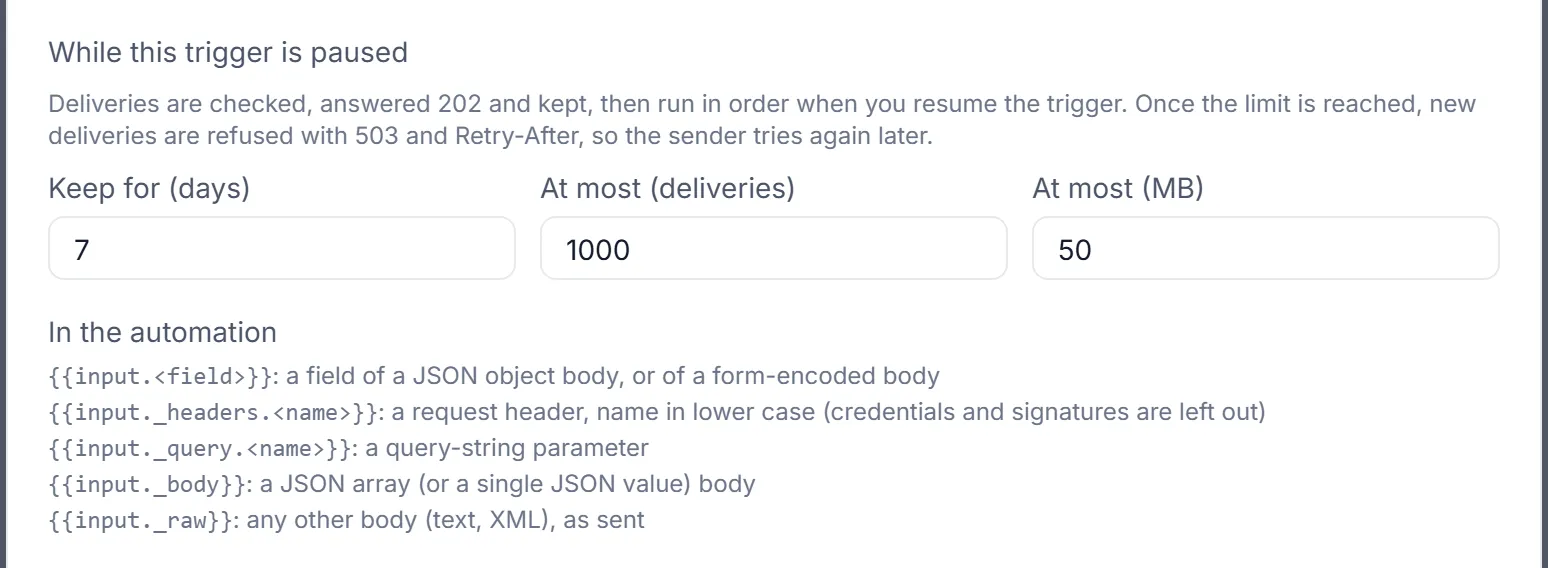
Under While this trigger is paused, the same form has three more settings: Keep for (days) (7 by default, 1 to 30), At most (deliveries) (1,000 by default) and At most (MB) (50 by default). See When the trigger is paused.
Authentication
Section titled “Authentication”Authentication is a credential checked in addition to the signature. Choose one:
| Authentication | The sender sends |
|---|---|
| None (the default) | Nothing extra. The signature and Allowed IP addresses are the only gates |
| work.studio API key | X-API-Key with a key from this organization and environment that may run automations (workflow:execute) |
| Shared secret header | A token in a header you name (default X-Webhook-Token) |
| Bearer token | Authorization: Bearer <token> |
| Basic auth | Authorization: Basic … with the user name and password you set |
| Connection | The credential held by a connection |
Every value is compared in constant time. A missing or wrong credential gets 401, whatever the reason: a wrong token, or an API key that is invalid, belongs to another organization or environment, or lacks workflow:execute. Basic and Bearer add a WWW-Authenticate header. 403 means the sender’s IP isn’t in Allowed IP addresses, or a customer key was sent to a work.studio API key webhook (see below).
A token or password Flow generates is shown once, when you save. Rotate issues a new one, also shown once, and the old one stops working immediately.
A work.studio API key webhook takes organization keys (svx_tk_…) only. A customer key (svx_ck_…) gets 403, because it acts for one customer and a webhook run isn’t scoped to a customer.
With Connection, the connection must belong to the webhook’s own organization. A webhook that names another organization’s connection, or one of work.studio’s own platform connections, is refused: 401, or 503 “Authentication unavailable” when the connection can’t be found.
Signatures
Section titled “Signatures”With Require a valid HMAC signature on and the Generic HMAC-SHA256 sender, sign every request like this:
- Take the current time in Unix seconds, for example
1761206400. This is the timestamp. - Build the string
<timestamp>.<raw body>: the timestamp, a dot, then the exact bytes of the body you send. - Compute the HMAC-SHA256 of that string, keyed with the signing secret, as lowercase hex.
- Send two headers:
X-Webhook-Timestamp: 1761206400X-Webhook-Signature: sha256=3f8a…BODY='{"orderId": "A-1001", "total": 129.00}'TS=$(date +%s)SIG=$(printf '%s.%s' "$TS" "$BODY" | openssl dgst -sha256 -hmac "$WEBHOOK_SECRET" -hex | sed 's/^.* //')
curl -X POST "$WEBHOOK_URL" \ -H "Content-Type: application/json" \ -H "X-Webhook-Timestamp: $TS" \ -H "X-Webhook-Signature: sha256=$SIG" \ -H "Idempotency-Key: order-A-1001" \ -d "$BODY"import hashlib, hmac, json, os, time, requests
body = json.dumps({"orderId": "A-1001", "total": 129.00}).encode()timestamp = str(int(time.time()))sig = hmac.new( os.environ["WEBHOOK_SECRET"].encode(), timestamp.encode() + b"." + body, hashlib.sha256,).hexdigest()
r = requests.post( os.environ["WEBHOOK_URL"], data=body, headers={ "Content-Type": "application/json", "X-Webhook-Timestamp": timestamp, "X-Webhook-Signature": f"sha256={sig}", "Idempotency-Key": "order-A-1001", }, timeout=30,)print(r.status_code, r.text)import crypto from 'node:crypto';
const body = JSON.stringify({ orderId: 'A-1001', total: 129.0 });const timestamp = Math.floor(Date.now() / 1000).toString();const sig = crypto .createHmac('sha256', process.env.WEBHOOK_SECRET) .update(`${timestamp}.${body}`) .digest('hex');
const res = await fetch(process.env.WEBHOOK_URL, { method: 'POST', headers: { 'Content-Type': 'application/json', 'X-Webhook-Timestamp': timestamp, 'X-Webhook-Signature': `sha256=${sig}`, 'Idempotency-Key': 'order-A-1001', }, body,});console.log(res.status, await res.text());The rules:
- Sign the exact bytes you send. Re-serializing the JSON after signing changes the bytes, and the signature fails.
- Don’t compress the body: a
Content-Encodingother thanidentitygets 415. - The timestamp must be within 5 minutes (300 seconds) of the server’s clock, either way. An older one gets 401, so a captured request can’t be sent again later.
- The signature can be hex or base64. The
sha256=prefix is optional. Signature header names a different header if your sender needs one. - If the webhook also has Authentication, send that header too, for example
X-API-Key. - A missing timestamp, a missing signature or a wrong signature gets 401.
Generic webhooks and X-Webhook-Timestamp
Section titled “Generic webhooks and X-Webhook-Timestamp”New Generic webhooks require X-Webhook-Timestamp. A signature over the body alone could be replayed for ever, so creating a Generic webhook without the requirement is refused (422). A sender that can only sign the body should use the GitHub or Shopify layout instead.
Webhooks created before this keep their setting. Flow recommends turning Require X-Webhook-Timestamp on once the sender sends the header. It asks you to confirm first, because from then on deliveries without the header are refused (401).
Other senders
Section titled “Other senders”GitHub, Stripe, Slack and Shopify sign requests their own way. Choose the service under Sender, and work.studio checks that service’s own signature:
| Sender | Headers it sends | What is signed | Secret |
|---|---|---|---|
| Generic HMAC-SHA256 | X-Webhook-Signature and X-Webhook-Timestamp (as above) |
<timestamp>.<raw body> |
work.studio’s signing secret |
| GitHub | X-Hub-Signature-256: sha256=<hex> |
The raw body | work.studio’s signing secret, pasted into GitHub |
| Stripe | Stripe-Signature: t=<unix>,v1=<hex> (timestamp checked) |
<t>.<raw body> |
Stripe’s whsec_… secret, pasted into work.studio |
| Slack | X-Slack-Signature: v0=<hex> and X-Slack-Request-Timestamp (timestamp checked) |
v0:<timestamp>:<raw body> |
Your Slack app’s Signing Secret, pasted into work.studio |
| Shopify | X-Shopify-Hmac-Sha256: <base64> |
The raw body | Shopify’s secret, pasted into work.studio |
Twilio signatures aren’t supported: Twilio signs the full public URL and the form fields, which our proxies change. For Twilio, use Shared secret header or Basic auth, or turn the signature off and use Allowed IP addresses.
The signing secret
Section titled “The signing secret”The signing secret is shown once, with Copy, when you create the Webhook trigger. It’s stored encrypted and never shown again.
- For a Webhook trigger, the secret can be fetched once, by the trigger’s creator or an admin, within 1 hour of creating it. The Flow editor does this for you when you create the trigger.
- Lost the secret, or created the trigger through the API or an assistant? Open the trigger in Flow and select Rotate Secret next to Signing secret. The new secret is shown once.
- After a rotation, the previous signing secret keeps working for 24 hours, so you have time to update the sending service. Tokens for Shared secret header, Bearer token and Basic auth have no such grace period.
- Stripe, Slack and Shopify issue their own secret: paste it into the signing secret field. For Generic and GitHub, Or use a secret you already have replaces the generated one, again with 24 hours’ grace.
- Moving a Stripe, Slack or timestamped Generic webhook to a layout without timestamps issues a new secret with no grace period, because requests captured under the old layout could otherwise be replayed. Flow asks you to confirm first (Issue a new signing secret?). To keep a Stripe, Slack or Shopify secret, paste it in with the change instead.
What the automation receives
Section titled “What the automation receives”The run’s input is built from the whole request:
| The request | In the run |
|---|---|
| A JSON object body | Its fields, at the top level: {"order": {"id": 42}} is read as {{input.order.id}} |
A form body (application/x-www-form-urlencoded) |
Its fields, at the top level. A field sent twice becomes a list: b=2&b=3 is ["2","3"] |
| A JSON array, or a JSON number, string or boolean sent as JSON | input._body, for example {{input._body[0].id}} |
| Any other body: plain text, XML, an unknown type | input._raw, the body as text. It isn’t parsed |
| Headers | input._headers, names in lower case, for example {{input._headers.x-store}} |
| Query parameters | input._query, for example {{input._query.source}}. A parameter sent twice becomes a list |
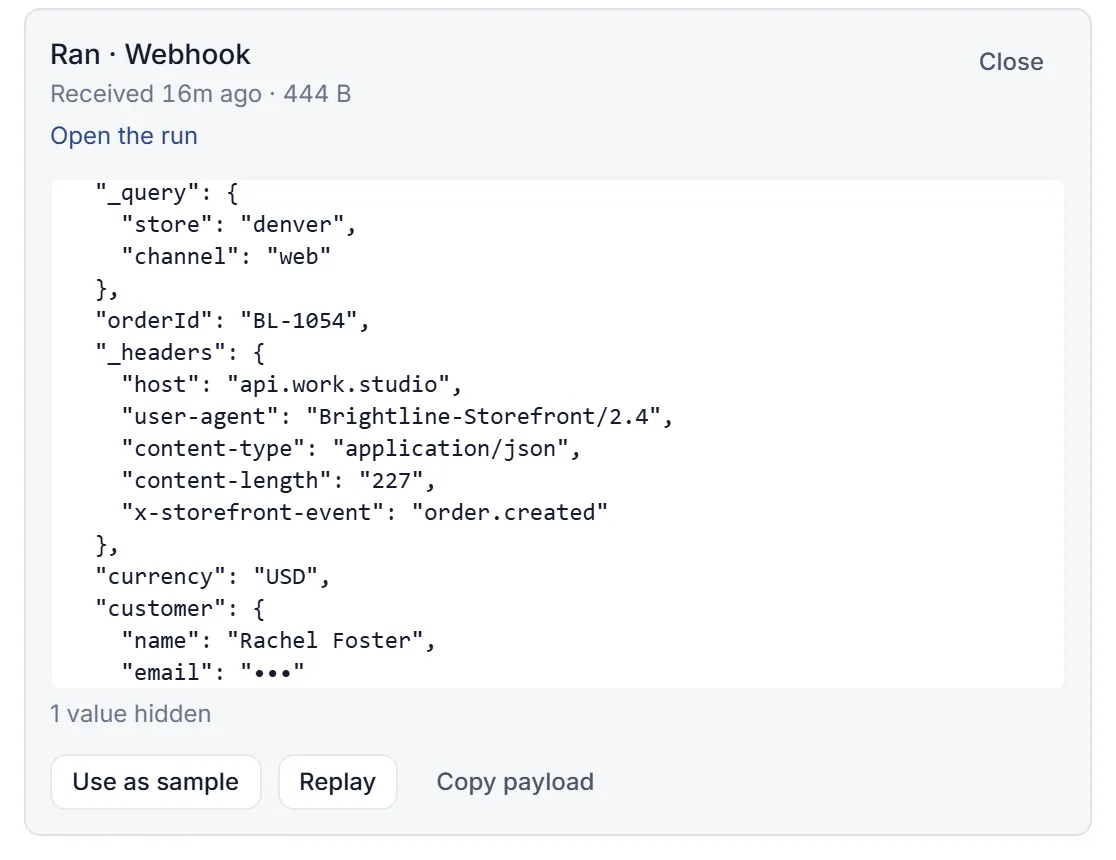
input._headers leaves out credentials, signatures and the headers work.studio’s own edge adds: Authorization, Cookie, X-API-Key, X-Webhook-Token (and the webhook’s own token header), every signature and signature-timestamp header (X-Webhook-Signature, X-Webhook-Timestamp, X-Hub-Signature-256, Stripe-Signature, X-Slack-Signature and others), X-Forwarded-*, X-Amzn-*, X-Real-IP, and any header whose name contains token, secret, signature or password, or ends in api-key.
A body field named _headers, _query, _raw or _body is replaced by the platform’s value.
Form posts, signed ones included, arrive in full: the body is read once, before anything else can consume it, and the signature is checked over those exact bytes.
The Webhook trigger’s form lists the same paths under In the automation.
Numbers are stored with the digits the sender wrote, so a delivery’s preview, Copy payload, replays and samples show 1.10 as 1.10. Inside the run, a decimal can still lose trailing zeros or precision (1.10 reads as 1.1). Send amounts as strings, or in cents, when every digit matters.
What the sender gets back
Section titled “What the sender gets back”| Case | Status | Body |
|---|---|---|
| Wait until the run has started (the default), and it started within the wait timeout | 200 | { "executionId", "workflowRunId", "status", "triggerStatus", "message" } |
| Wait until the run has started, still starting at the timeout | 202 | { "executionId", "status": "SUBMITTED", "message" } |
| Wait until the run has started, the trigger answered but no run exists yet | 202 | The same fields as the 200, with workflowRunId empty |
| Acknowledge immediately | 202 | { "executionId", "status": "SUBMITTED", "message" } |
| A repeat of a delivery already accepted | 200 or 202 | { "executionId", "status", "duplicate": true, "message" } (see Duplicates and retries) |
| The automation couldn’t be started yet; work.studio will retry it | 202 | { "executionId", "status": "RETRYPENDING", "willRetry": true, "message" } |
| The automation couldn’t be started and no retry is left, or its run will never start | 500 | { "executionId", "status": "FAILED", "ERROR": "Failed to trigger workflow", "willRetry": false } |
| A rejection (see Troubleshooting) | 4xx or 503 | { "ERROR": "<reason>" } |
Waiting is for the run to start, not to finish: the reply carries the run id, never the automation’s output, and the webhook doesn’t report how the run ends. Look the run up by its id, or, to get a result back in the reply, have the sender call the execute API instead.
The trigger’s own answers:
- 202
{ "executionId", "deliveryId", "status": "QUEUED", "queued": true, "message" }: the trigger is paused and the delivery is queued (see When the trigger is paused). - 202
{ "executionId", "deliveryId", "status": "SAMPLED", "sampled": true, "message": "Captured as a sample. The automation did not run." }: someone is listening for a sample, so the delivery is kept as a sample and doesn’t run. - 409 with a message: the trigger is paused and can’t queue this delivery.
- 410
{"ERROR":"Gone"}: the trigger was deleted, or the webhook was made on the retired Setup › Webhooks page (with amessage). - 422 with the trigger’s message: the trigger refused the delivery for good, for example “The automation has no published version. Publish it, then resume this trigger.” It isn’t retried.
- 503
{"ERROR":"Trigger paused and its queue is full"}, withRetry-After: 300.
Duplicates and retries
Section titled “Duplicates and retries”A delivery that arrives twice runs once, as long as work.studio can tell the second arrival is a repeat. It recognizes a repeat by:
- the sender’s delivery id:
X-GitHub-Delivery,X-Gitlab-Event-UUID,X-Atlassian-Webhook-Identifier,X-Shopify-Webhook-Id,Webhook-Id,svix-idorIdempotency-Key; - Stripe’s event id and Slack’s
event_id, once the signature has verified; - the timestamped signature itself: the same signed request sent again within the 5-minute window.
Send Idempotency-Key from your own systems to make retries safe. A sender that re-signs its retry (a new timestamp, so a new signature) and sends no delivery id can’t be recognized: each re-signed retry is a new delivery.
A repeat is answered with the first delivery’s executionId and "duplicate": true, and the automation doesn’t run again: 200 once the first delivery has finished or failed, 202 while it is still in progress.
If the first delivery failed for good without being handed to a run, a retry from the sender (Stripe and Slack re-send, GitHub’s Redeliver) re-opens that same delivery and tries again. A run an earlier attempt did start is found and handed back rather than started twice; a run work.studio knows never started is replaced by a new one. If the delivery was handed to a run (even one that then failed, or one work.studio gave up on without knowing whether it started), the delivery has had its run, and the retry is answered as a duplicate.
An exact copy of a failed request is a duplicate when its signature carries a timestamp (Generic with X-Webhook-Timestamp, Stripe, Slack). Without one (GitHub, Shopify), an exact copy can’t be told apart from the sender’s own redelivery, and re-opens the delivery the same way.
work.studio’s own retries. If handing a delivery to the trigger service fails for a reason that can pass, such as a timeout, an outage or a busy service, work.studio retries by itself, up to eight times: after about 1, 2, 4, 8, 16 and 32 minutes, then hourly, about three hours in all. It answers 202 whenever it will retry a delivery itself, so the sender stops retrying: those three hours are the delivery’s whole horizon. The trade-off is lateness: during a long outage a delivery can start hours after it arrived, and the sender’s own retries meanwhile are answered “in progress”.
- A delivery whose hand-over was cut short (the service restarted mid-call), or that was accepted but has no run yet, is picked up by a sweep that runs every 5 minutes and acts on deliveries untouched for 10 minutes. In practice that retry comes about 10 to 15 minutes later.
- A delivery that still has no run after four hours, and isn’t still being started, is marked failed. The sender’s next retry re-opens it.
- When work.studio knows the run will never start (every attempt to dispatch it was refused, for example by a data plane that stayed unavailable), the delivery fails at once (500,
"willRetry": false) with no retries of its own. The sender’s next retry re-opens it and starts a new run. - Every retry carries the delivery’s key, so a run an earlier attempt started is found and handed back instead of a second one being started.
A refusal from the trigger, such as “no published version”, is answered 422 and isn’t retried.
When the trigger is paused
Section titled “When the trigger is paused”A paused Webhook trigger still accepts deliveries, so callbacks that can’t be sent again aren’t lost:
- The request is checked exactly as when the trigger is on: the method, size and IP rules, Authentication and the signature. A request that fails is refused, and nothing of it is stored.
- A request that passes is queued, and the sender gets 202 with
"queued": trueand adeliveryId. Deliveries also queue while earlier ones are still waiting, so they keep their order. - A repeat of a queued delivery (the same delivery id or
Idempotency-Key) isn’t queued twice. - When you select Resume, Flow asks whether to Run N waiting or Discard and resume. The waiting deliveries run one at a time, in the order they arrived. Each runs the published version, with the same checks as any other delivery.
- Flow and my.studio show the waiting count on the trigger, “12 deliveries are waiting. Resume to run them in order”, with Discard to drop them.
- A delivery waits 7 days by default (Keep for (days), 1 to 30). Then it expires and never runs.
- At most 1,000 deliveries (At most (deliveries)) or 50 MB (At most (MB)) can wait. Past that, new deliveries get 503 with
Retry-After: 300, so the sender tries again later. - A deleted trigger’s URL answers 410
{"ERROR":"Gone"}, and anything still waiting is dropped.
Delivery history
Section titled “Delivery history”Each trigger keeps a list of its deliveries for 30 days. In Flow, open Deliveries on the trigger’s card, or select Deliveries on its row in Setup › Triggers. Each row shows the time, where the delivery came from, the result (Ran, Waiting (trigger paused), Already received, Refused, Expired while waiting, Discarded, Failed, Skipped or Sample only (not run)), the reason in words, and a link to the run.
Refused deliveries are listed too, with the reason: for example, the signature didn’t match, the signed timestamp was too old, the sender didn’t authenticate, there were too many deliveries in a minute, the body was over the size limit or of an unsupported type, the HTTP method isn’t allowed, or the trigger was paused and its queue was full. A refused request’s body is never stored. During a flood, at most 20 refusals a minute are recorded per trigger, and the rest are counted on the last row of the same kind.
Deliveries of someone’s personal automation are listed only for that person; others see “N private deliveries”. The list never shows bodies or headers.
People who can edit the automation can open a delivery for a masked preview, copy its full content, use it as a sample for the trigger’s input fields, or Replay it: the delivery runs again on the current published version, marked as a replay. A delivery refused because the sender failed authentication can’t be replayed, and none can after 30 days. One refused because the automation had no published version can be replayed once you publish it. See Deliveries.
Troubleshooting
Section titled “Troubleshooting”| Status | Body ERROR |
Likely cause |
|---|---|---|
| 400 | Bad request |
The body couldn’t be read |
| 401 | Unauthorized |
Every refusal of a credential or signature answers this. Check that you send X-Webhook-Timestamp, that the timestamp is current (within 5 minutes), that you signed <timestamp>.<body> over the exact bytes you sent with the current secret, and that you send the Authentication header if one is set |
| 403 | Forbidden |
The sender’s IP isn’t in Allowed IP addresses |
| 404 | Not found |
No webhook has this URL |
| 405 | Method not allowed |
The method isn’t in Allowed HTTP methods |
| 413 | Payload too large |
The body is larger than Max body size (KB) |
| 415 | Unsupported Media Type |
The body is compressed (Content-Encoding). Send it uncompressed |
| 429 | Too many requests |
More requests in a minute than Rate limit (requests / minute) |
| 500 | Webhook is not configured correctly |
Signing is on but the webhook has no secret, or its credential is missing. Rotate the secret or set the credential |
| 500 | Failed to trigger workflow |
The run couldn’t be started and no retry is left |
| 503 | Webhook is not active |
The webhook’s status isn’t Active |
| 503 | Authentication unavailable |
work.studio couldn’t check the credential just then. The sender should retry |
Also check 409 (the trigger is paused and couldn’t queue the delivery: resume it), 410 (the trigger was deleted, or the URL came from the retired Setup › Webhooks page), 422 (the trigger refused the delivery, most often because the automation has no published version), 503 with Retry-After: 300 (the paused trigger’s queue is full), and the trigger’s delivery history, which shows which check failed.