

API keys
An API key lets your own systems call work.studio without a person signing in. There are two kinds.
| Key | Starts with | Acts for | Made in |
|---|---|---|---|
| Organization key | svx_tk_ |
Your whole organization, in one environment | Avatar menu › Account › API Keys |
| Customer key | svx_ck_ |
One of your customers | Avatar menu › API Keys |
Other prefixes belong to other features. Embed keys (svx_ik_) and session tokens (svx_st_) are for Embed. Customer MCP keys (svx_mk_) are for customer MCP URLs.
Send a key
Section titled “Send a key”Put the key in the X-API-Key header:
curl https://api.work.studio/api/v1/workflow/run/<run-id> \ -H "X-API-Key: $WORKSTUDIO_API_KEY"- The key decides the organization and environment. You don’t send
X-SELECTED-TENANTorX-SELECTED-ENVwith a key, and they’re ignored if you do. - If a request carries both
Authorization: Bearer …andX-API-Key, the bearer token is used and the key is ignored.
Create an organization key
Section titled “Create an organization key”- Open the avatar menu and select Account.
- In the left menu, under AI & Agents, select API Keys. The page is titled Tenant API Keys.
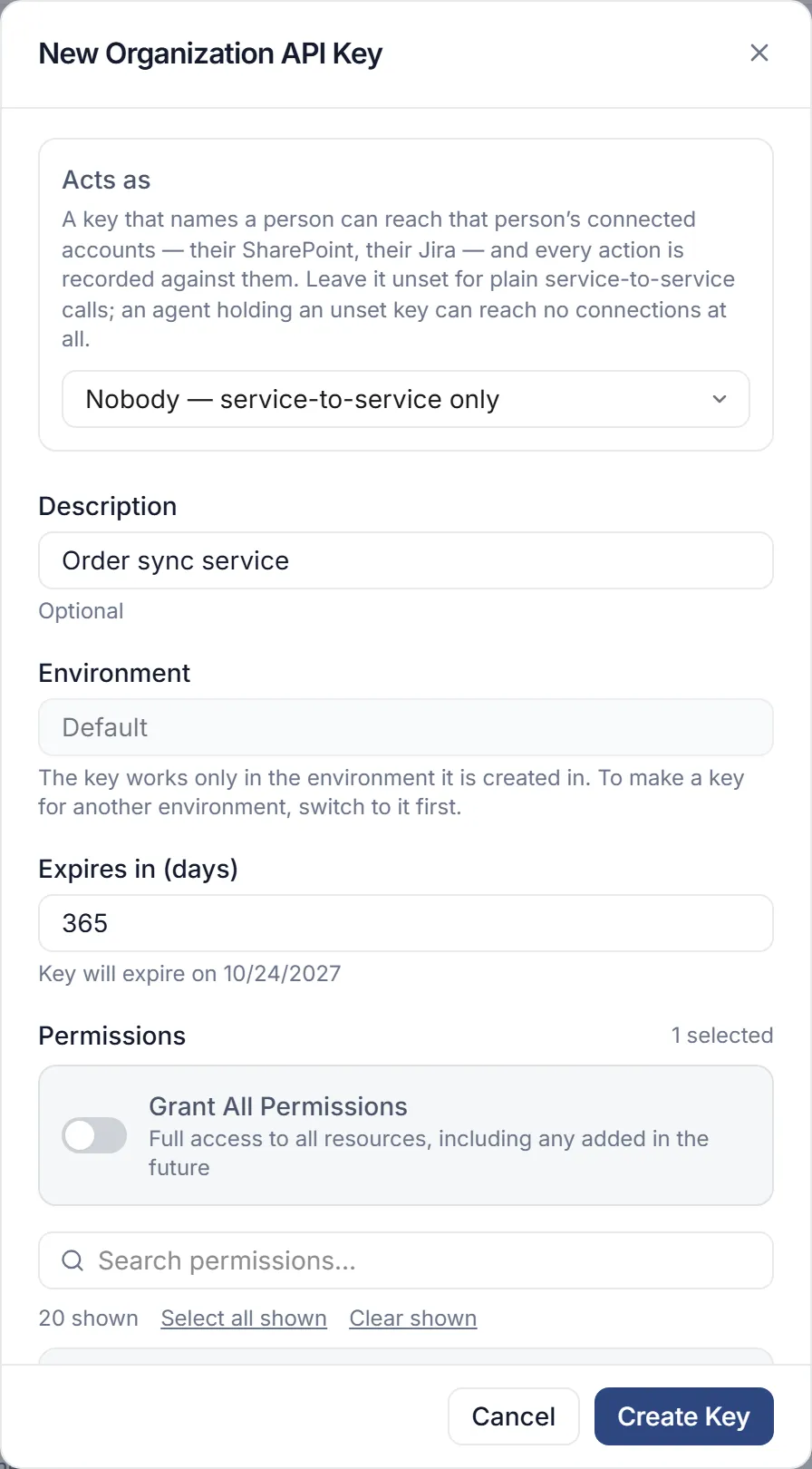
- Select New API Key. The New Organization API Key dialog opens.
- Fill in the fields (see Key settings) and select Create Key.
- Copy the key. The dialog says “Save this key now — you won’t be able to see it again.”
An organization key reaches its whole environment, within its permissions. The page calls them “High-privilege keys” meant for backend services in your own infrastructure. Store them in environment variables or a secret manager.
Create a customer key
Section titled “Create a customer key”A customer key is bound to one of your customers. It suits a tool that acts for that one customer, such as a Power Automate or Zapier flow.
- Open the avatar menu and select API Keys. The page says “Keys that let external tools call this scope”.
- Pick the customer in the selector at the top. Until you do, the page shows Select a scope.
- Select New API Key. The New Customer API Key dialog opens.
- Fill in the fields and select Create Key, then copy the key.
Key settings
Section titled “Key settings”| Field | What it does |
|---|---|
| Acts as | Names a person whose connected accounts the key may use, with every action recorded against them. Leave it at Nobody — service-to-service only for plain service calls. |
| Description | A note for your team |
| Environment | Which environment the key is for. It shows in the key itself, such as svx_tk_prod_… |
| Expires in (days) | Default 365, from 1 to 730 |
| Permissions | What the key may do (see below), or Grant All Permissions for broad access, including anything added later |
| Allowed IP Addresses | Comma-separated addresses or CIDR ranges the key may be used from. Leave empty to allow all |
What permissions control
Section titled “What permissions control”Calls that need a permission check the key’s own permissions, not those of the person who created it. Grant All Permissions passes those checks within the standing of whoever issued the key (see below). Some calls name what a key needs separately from what a person needs; the run calls are the common case. A few calls need no permission at all, such as reading who you are. These are the ones you’ll use most:
| Permission (label) | Needed for |
|---|---|
workflow:execute (Run Automation) |
Running an automation: POST /execute/…, cancelling or resuming a run, and reading runs: GET /run/{runId}, POST /run/{runId}/wait, the run stream and list |
workflow:read (View Automation) |
Reading automations and runs without running anything |
tool:read (Read Tools) |
Calling work.studio’s MCP server with a key, for tools that only read |
tool:update (Update Tools) |
Calling work.studio’s MCP server with a key, for every tool, including those that change things |
A missing permission returns 403. To run an automation and then poll for its result, Run Automation is enough.
A customer key made without choosing permissions gets Run Automation only.
A key must be created with permissions or with Grant All Permissions; a key with an empty list is refused. A permission is lower-case words joined by colons, such as workflow:execute, optionally ending in :* (workflow:*), or * alone. Anything else - a comma, a space, upper case - is refused with a 400.
Grant All Permissions is for organization owners and admins (organization-wide, not of one environment). A key an owner issues passes every permission check; a key an admin issues passes all of them except what only an owner can do - change billing, or act as another person (apikey:impersonate). One permission is never included: tenants:provision, which creates managed tenants, is held only by a key that lists it by name, only a work.studio platform operator can add it, and no key or token passes it on. A key can never pass on more than it holds: a key that issues a key, or is exchanged for a token, hands on at most its own permissions.
Some calls refuse customer keys outright and need an organization key. Reading automation definitions is one: a customer key gets 403 “Customer API keys cannot read automation definitions”.
Personal automations
Section titled “Personal automations”A personal automation belongs to one person (see Personal automations). An organization key can’t change one, and runs one only when the key acts as its owner: its Acts as names that person. Anyone can issue a key that acts as themselves; issuing one that acts as someone else takes the apikey:impersonate permission, which only Owners have. Any other key gets 403 “This key may run only in its own user’s scope”.
Act for one customer with an organization key
Section titled “Act for one customer with an organization key”Send X-Scope-Key with an organization key to act for one customer. Use your own id for them, such as customer:acme, or the customer’s UUID.
curl -X POST "https://api.work.studio/api/v1/workflow/execute/send-welcome-email" \ -H "X-API-Key: $WORKSTUDIO_API_KEY" \ -H "X-Scope-Key: customer:acme" \ -H "Content-Type: application/json" \ -d '{"email": "jordan@example.com"}'A customer key always acts for its own customer and ignores the header.
Exchange a key for a short-lived token
Section titled “Exchange a key for a short-lived token”When a call happens somewhere less trusted than your server, exchange the organization key for a token bound to one customer:
curl -X POST https://api.work.studio/api/v1/workflow/connection/service-api-keys/token-exchange \ -H "X-API-Key: $WORKSTUDIO_API_KEY" \ -H "Content-Type: application/json" \ -d '{"scopeKey": "customer:acme", "expiresInSeconds": 3600, "permissions": ["workflow:execute"]}'The response has accessToken, tokenType (Bearer), expiresIn, expiresAt and the customer in scope. Send it as Authorization: Bearer <accessToken>. Tokens last one hour by default, from 60 seconds up to 24 hours. Only organization keys can be exchanged.
The token carries the permissions you list in permissions, here only workflow:execute. List just what your calls need. Leave permissions out and the token carries all of the key’s permissions; asking for more than the key holds gets you nothing extra.
The same exchange is also available in standard OAuth 2.0 token-exchange form (RFC 8693) at POST /api/v1/workflow/connection/oauth/token, form-encoded, with the key in X-API-Key, grant_type=urn:ietf:params:oauth:grant-type:token-exchange, subject_token=customer:acme and subject_token_type=urn:spacevox:params:oauth:token-type:scope-key.
Rotate or revoke a key
Section titled “Rotate or revoke a key”From the key’s row:
- Rotate Key makes a new key. Set Grace period (days), default 7, from 1 to 90: the old key keeps working that long, so you can switch over. Copy the new key; it is shown once.
- Revoke Key stops the key at once. You can give a Reason for revocation. This can’t be undone.
- Edit Permissions changes what an organization key may do.
When a key is refused
Section titled “When a key is refused”| Status | Why |
|---|---|
| 401 | The key is invalid, revoked, expired, or past its rotation grace period |
| 403 | The request came from an address not in Allowed IP Addresses, the key lacks a permission the call needs, or the call needs an organization key |