

Run an automation from your code
Your backend can start any published automation with one HTTP call, then read its result. No trigger setup is needed.
Before you start:
- The automation is published. The API runs the latest published version, and refuses an automation that has none (“Workflow has no deployed version. Please deploy the workflow first.”). See Test and publish.
- You have an API key with Run Automation, and View Automation if you will poll for the result.
1. Find the automation’s endpoint
Section titled “1. Find the automation’s endpoint”- Open the automation in Flow.
- In the editor toolbar, select Automation Details. The Automation Information dialog opens.
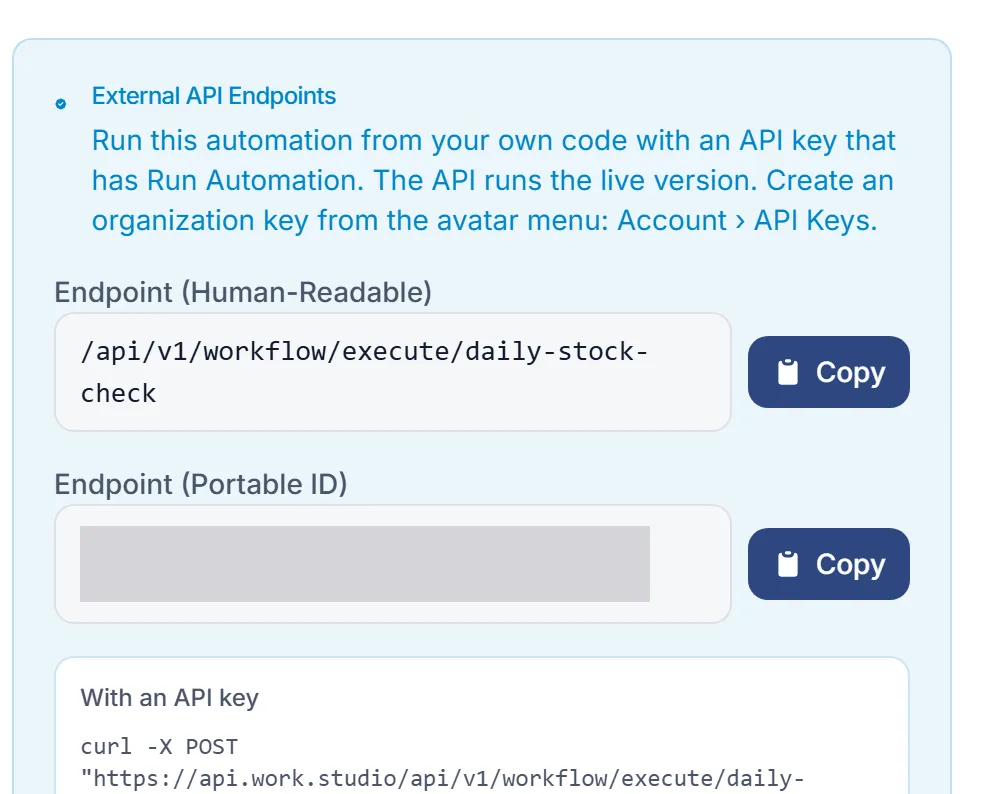
- Under External API Endpoints, copy one of the two paths:
- Endpoint (Human-Readable):
/api/v1/workflow/execute/<endpoint>, using the automation’s endpoint name. - Endpoint (Portable ID):
/api/v1/workflow/execute/id/<global-unique-id>. An automation imported from another organization keeps its Global Unique ID. One promoted to another environment of your own organization is a copy with its own ID, so look its endpoint up in that environment (see Environments).
- Endpoint (Human-Readable):
On the Automations list, the row menu’s Copy endpoint copies just the endpoint name.
2. Start a run
Section titled “2. Start a run”Send the automation’s input as the JSON body, as an object. It arrives in the automation as {{input.…}}.
curl -X POST "https://api.work.studio/api/v1/workflow/execute/send-welcome-email" \ -H "X-API-Key: $WORKSTUDIO_API_KEY" \ -H "Content-Type: application/json" \ -d '{"email": "jordan@example.com", "plan": "team"}'import os, requests
API = "https://api.work.studio/api/v1/workflow"HEADERS = {"X-API-Key": os.environ["WORKSTUDIO_API_KEY"]}
resp = requests.post( f"{API}/execute/send-welcome-email", headers=HEADERS, json={"email": "jordan@example.com", "plan": "team"}, timeout=60,)resp.raise_for_status()result = resp.json()run_id = result["executionResult"]["runId"]print(result["runStatus"]["status"], run_id)const API = 'https://api.work.studio/api/v1/workflow';const headers = { 'X-API-Key': process.env.WORKSTUDIO_API_KEY, 'Content-Type': 'application/json' };
const res = await fetch(`${API}/execute/send-welcome-email`, { method: 'POST', headers, body: JSON.stringify({ email: 'jordan@example.com', plan: 'team' }),});const result = await res.json();const runId = result.executionResult.runId;To run the automation for one of your customers with an organization key, add X-Scope-Key: customer:acme. A customer key always runs for its own customer.
A personal automation runs only with a key that acts as its owner (see API keys). Any other key gets 403.
What comes back
Section titled “What comes back”By default the call waits up to 30 seconds for the run to finish. The response looks like this (some fields left out):
{ "runStatus": { "routeRun": "6f1c2a9e-…", "status": "FINISHED", "error": null, "value": "…" }, "executionResult": { "runId": "6f1c2a9e-…", "workflowId": "…", "finalOutputUrl": "https://…" }}executionResult.runId(the same value asrunStatus.routeRun) is the run’s id.runStatus.statusis the run status.runStatus.errorexplains a failure.executionResult.finalOutputUrllinks to the result. See step 4.runStatus.valuecan carry the result inline on a call that waited.
The call answers HTTP 200 even when the run itself failed, so check runStatus.status.
If the run is still going when the 30 seconds run out, you get status: "RUNNING" and the run id. The run carries on; follow it as in step 3.
3. For longer runs, start it and follow it
Section titled “3. For longer runs, start it and follow it”Add ?async=true to return at once with the run id, while the run is still queued:
curl -X POST "https://api.work.studio/api/v1/workflow/execute/send-welcome-email?async=true" \ -H "X-API-Key: $WORKSTUDIO_API_KEY" \ -H "Content-Type: application/json" \ -d '{"email": "jordan@example.com"}'Then either wait or poll. Both need View Automation on the key.
| Call | What it does |
|---|---|
POST /api/v1/workflow/run/{runId}/wait?timeout=60000 |
Holds the call until the run ends. timeout is in milliseconds, default 30000, at most 120000. Answers 200 when the run has ended, 408 with the current run if it is still going. |
GET /api/v1/workflow/run/{runId} |
Returns the run now. Poll it every few seconds. |
import time
while True:    run = requests.get(f"{API}/run/{run_id}", headers=HEADERS, timeout=30).json()    if run["status"] in ("FINISHED", "FAILED", "CANCELLED", "TERMINATED"):        break    time.sleep(2)
Run statuses
Section titled “Run statuses”| Status | Meaning |
|---|---|
QUEUED, PARSING, PENDING |
Accepted, not running yet |
RUNNING |
Running |
WAITING_HUMAN |
Paused at a step waiting for a person, such as an approval |
FINISHED |
Ended normally |
FAILED |
Ended with an error |
CANCELLED, TERMINATED |
Stopped before it finished |
A run that reaches WAITING_HUMAN is not finished. It continues once someone answers, so a /wait call can time out on it.
4. Get the result
Section titled “4. Get the result”The run’s result sits behind finalOutputUrl, on the execute response and on GET /run/{runId}. It is a pre-signed link: fetch it with a plain GET and no API key.
run = requests.get(f"{API}/run/{run_id}", headers=HEADERS, timeout=30).json()body = requests.get(run["finalOutputUrl"], timeout=30).json()The file holds the run’s result as JSON. A result that is plain text is a JSON string.
The link expires after 30 to 60 minutes. To get fresh links for an older run, call POST /api/v1/workflow/run/{runId}/refresh-presigned-urls.
Find a run by your own id
Section titled “Find a run by your own id”Put an externalId field in the input, then look the run up with GET /api/v1/workflow/run/by-external-id/{externalId}. This needs View Automation.
Retry safely with an idempotency key
Section titled “Retry safely with an idempotency key”A run created directly with POST /api/v1/workflow/run (body { "workflowId", "inputData", "idempotencyKey" }) runs at most once per automation and idempotencyKey. Send the same key again whenever you don’t know whether the first request got through:
| Answer | Meaning |
|---|---|
| 202 | The run was created (or its earlier, never-started copy was dispatched) and is starting. |
| 200 | The run for this key already started, or Flow can’t rule out that it did. It’s returned as it is, whatever its status. A run whose dispatch had an outcome Flow can’t know, and that Flow then gave up on, is returned FAILED and is never dispatched again: starting another run under a new key could run the work twice. |
503 with Retry-After |
The run for this key exists but hasn’t started yet - it is being dispatched, it was refused and may be dispatched again, or its last dispatch may still turn out to have reached a data plane. Send the same key again after the Retry-After seconds. This lasts minutes: about 15 minutes without a dispatch at most, and never for a run more than 23 hours old. |
| 409 | The run for this key never ran and never will: every attempt to dispatch it was refused before anything was sent, and Flow has given up on it. Nothing ran, so a new key starts the work safely. |
Troubleshooting
Section titled “Troubleshooting”| Symptom | Cause and fix |
|---|---|
| 401 | The key is missing, wrong, revoked or expired. See API keys. |
| 403 “Missing required permission: workflow:execute” | Give the key Run Automation. For /run/… calls, View Automation. |
| “Workflow has no deployed version” | Publish the automation in Flow. |
| The automation ran with empty input | The body was empty, or it wasn’t a JSON object. Send a JSON object. |